↓
 

Computer Aid

Ph: 0402 133 866

  • Home
  • Blog
  • Contact
  • Web Services
    • Websites
    • SEO
    • Hosting
    • Domain Names
    • Portfolio
Home→Author Luigi Martin - Page 3 << 1 2 3 4 5 … 78 79 >>

Author Archives: Luigi Martin

Post navigation

← Older posts
Newer posts →

GA B75M-D3H sleep problem

Computer Aid Posted on 11 June, 2013 by Luigi Martin11 June, 2013

I have a Gigabyte B75M-D3H motherboard, and decided to try upgrading from 1333Mhz RAM to 1600Mhz RAM.

It didn’t work (either because the CPU cant handle it, or the motherboard can’t).

The Gigabyte website said it should work.

So then I looked at the bios version, and I was on version F4, and the latest was F14.

A quick upgrade later, I found the 1600 RAM still didn’t work, so I gave up.

A few days later, my PC started acting strange:

  • Sometimes it wouldn’t come out of sleep.
  • After it refused to “wake up” even hitting the reset button didn’t seem to make it restart
  • At some point I even had to switch off the power at the wall
  • A few days later, it got worse: it suddenly refused to start… I tried everything, and it started to look like a motherboard failure (or a bad bios flash)

As a last resort, I decided to find the “clear CMOS” pins (2 metal pins near the row of pins for the front switches and lights)… just remove all power, and short out the 2 pins with a screwdriver (I have a special jumper for shorting it out)… maintain the short for 5 – 10 seconds.

After that, I was relieved that the motherboard finally started working correctly.

Overnight, the PC went into sleep mode, and then resumed normally the next day.

I must remember this for times when it appears the PC is dead due to a motherboard fault! KBYWJ95GCHCQ

Posted in Technical | Tagged B75M-D3H, sleep

increase your wordpress security

Computer Aid Posted on 1 May, 2013 by Luigi Martin1 May, 2013

I’ve noticed over the years, that many wordpress blog sites have become prone to hacking, and eventually get shut down… which is a shame, as a lot of useful information gets lost along the way.

With just a small amount of work, wordpress can be made secure enough, that you are highly unlikely to get your site hacked.

Change your default admin username

Admittedly, this should be done when you create your blog, as its very difficult to change later (requires database changes). This is an effective method, as most brute-force hackers will assume a username of “admin” and then try a few obvious passwords to get admin access to your blog. by creating the default admin username thats something like: admin654, you make all the hacking attempts a complete waste of time for the hackers, as they need to guess both your username and password.

Use a complex password

This is something thats been taked about by security experts for many years. yet its easy to do, with just a bit of thought: Pick either a well known phrase thas you know eg: Mary Had A Little Lamb, and that becomes a password like: Mhall, then add a number that you know (eg you are born on 19 July: Mhall1907, and there you have it! You can mix this around, eg: 1907Mhall, or: 19Mhall07, or 07MhAlL19

Dont get your web browser to “remember” you login details

I’ve been hit with this problem in the past: sooner or later, you will get infected with a virus/malware. Its quite a simple for the infecting software to get all the saved browser details (website, usernames, and passwords), and then send them to someone who will hack every account you have… VERY dangerous. This applies to virtually every browser, as well as FTP clients like filezilla. So what can you do instead? Use software like keepass, it can store all your passwords, and you only need to remember 1 password to access keepass. You are trading security for the inconvenience of typing your keepass password every to you need to logon to a website.

Update WordPress

Another obvious and simple step: at least once per month, login to the wordpress admin panel, and make sure wordpress and all plugins/themes are fully updated. If you don’t update wordpress quickly, then your blog is at risk of an attacker using a flaw in the wordpress system to hack your website without even knowing your username/password!!!

Install a security plugin

For extra peace of mind, install a security pluging like: “WordPress File Monitor Plus”, and/or “Login Security Solution”


Once you implement these systems, you will find maintaining this security will only take a few minutes per month, so its a very worthwhile investment.

Posted in Technical, Wordpress | Tagged security, wordpress

Computer Operating system stats April 2013

Computer Aid Posted on 24 April, 2013 by Luigi Martin24 April, 2013

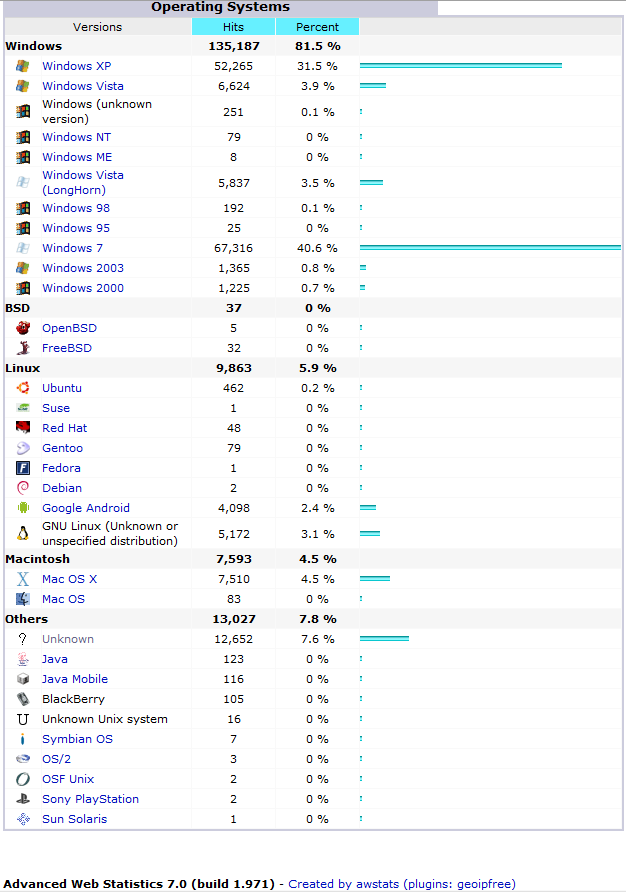
I recently looked at the stats for my website, as its interesting to see who/what views computer-aid.com.au.

os stats

Now whats interesting is that 81.5% of all my traffic comes from Microsoft windows computers, but then, thats not all that surprising, considering that most of my blogs are about MS Windows.

But what is interesting, is that Windows 7 & XP represent 72% of all my traffic, and that XP is still 10 times more popular than Vista.

I don’t seem to have any stats on windows 8, so I suspect AWStats is not logging it correctly yet, so I can only assume its either ignored, or its appearing under an incorrect category (ie Windows 7, longhorn, or “unknown”).

Whats interesting is that linux is more popular than macOS.

Whats also worth noting, is that android represents 2.4%. I can see Android increasing market share in the future.

Posted in Technical | Tagged the fall of microsoft

The name you specified is not valid or too long

Computer Aid Posted on 24 April, 2013 by Luigi Martin24 April, 2013

I recently did some data recovery for someone who “accidentally” re-installed Windows 7.

I managed to recover about 80% of the data.

But the data recovery program that I used got caught in a loop, so some recovered folders ended up about 30 or 40 sub-folders deep

This type of scenario often shows what shortcuts Microsoft take when designing their OS…

In this case, I was using Windows XP.

When I tried to copy a whole recovered folder tree, I would get the error:

The name you specified is not valid or too long

It was soon obvious that XP has a short internal buffer for storing a folder path.

The filesystem (NTFS) could easily create virtually unlimited folder depths, but windows explorer (and possibly the underlying OS itself, could not cope with something like:

C:recoveryDocuments and SettingsuserAppdataRoamingMicrosoftWindowsLibrariesOfficeOutlookLocalTemporary Internet FilesIE5.6WindowsMicrosoftAppdataOfficeOutlookLocalIE1.2Temporary Internet FileswindowsuserAppDataMicrosoftRoaming..

Anyway, you get the message.

Since I couldn’t copy these files and folders, I should just delete them, right?

But deleting them gave the error: The name you specified is not valid or too long.

error-deleting-file

So what do I do now?

I had a hunch that the buffer was just used to store the full path name (ie the long string of folders above), so if I renamed the folders to a shorter name, it might fit into the XP buffer, and I can finally delete them.

It turns out I was right.

I had about 50 folder paths to rename, but I eventually got them all to be shorter. Using the above as an example, I just renamed each folder using the first character in its name ie:

c:rduarmwlooltiwmaoolitwuamr

Sure, it looks crazy, but the overall length means I could finally delete the offending files and folders.

I’m sure that if I looked hard enough, I would have found a windows explorer equivalent that didn’t have the same restrictions… but given the time constraints, it was just easier to just spend 30 minutes renaming the folders (its really fast if you use keyboard shortcuts like: F2=rename folder, and arrow keys,  spacebar, enter key, all at the correct time.

Posted in Technical | Tagged name you specified, not valid, too long

Goro page when making google your default search provider

Computer Aid Posted on 2 April, 2013 by Luigi Martin2 April, 2013

I’ve been setting up a few old computers with new installs of XP.

The biggest issue with using internet explorer 8 at the moment is that if you reside outside the USA, microsoft will not let you select google as a default search provider.

The next step is to do a google search for:

google default search provider

And the top item is:

http://www.google.com/homepage/search/

Ie: google “seems” helpful enough to do what Microsoft refuses to do.

But there is a problem:

You go to the page, click on the button that says: “make google my search provider”, then go through the steps to complete the action.

You now feel warm and fuzzy, because the search box at the top right says google…

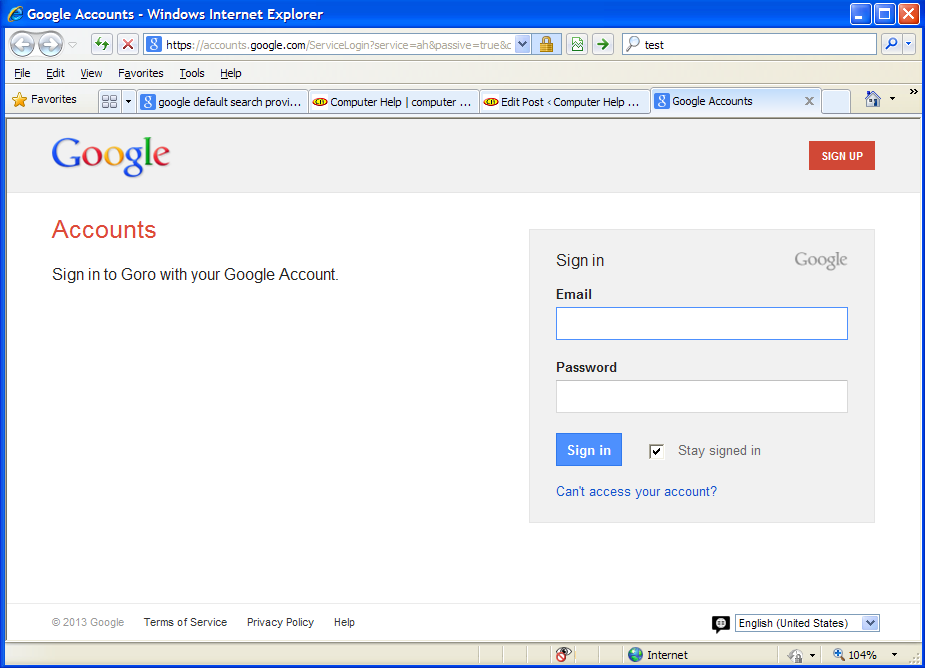
But when you try to search, you get:

goro1

At first glance, I thought I made a mistake, but a closer look shows that Goro is actually part of Google.

So now I’m thinking: did Google somehow stuff up their attempt to change the default search provider away from Bing?

Or is Google trying to force people to switch to a google account?

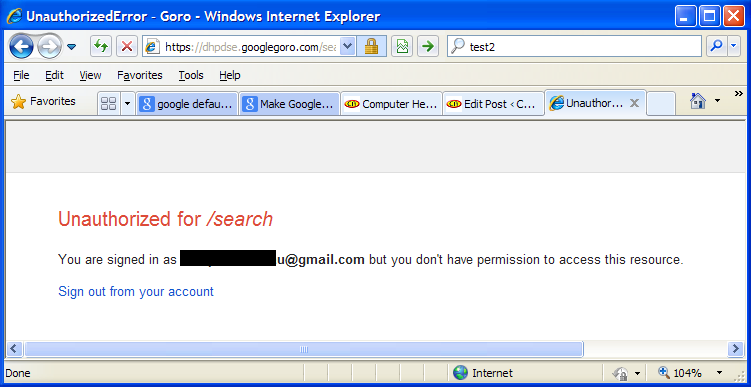
I tried to login to my google account, and the search provider box then gives me:

goro2

So its now obvious that google have shot themselves in the foot (and Microsoft can breath a tiny sigh of relief… with the unfolding disaster otherwise know as Windows 8, Microsoft need all the help they can get!).

So what do I do? IE8 (as far as I can see) no longer allows you to manually setup your own search provider by entering the appropriate URL… so thats no longer an option.

The eventual (ugly) solution is:

Go to control panel, and temporarily change your “Regional and Language Options” in Control panel… from English (Australia) to English (Untied States 🙂 ) . Then, when you tell IE8 that you want to find more providers, you are given a much wider choice, including Google.

Its starting to feel like Google is getting too big, and are heading down the same path as Microsoft… Lots of big plans, but forgetting to take enough care to dot the “i” and cross the “t”

Posted in Browser, Technical, Tutorial | Tagged default search provider, Google

transfer emails from thunderbird to outlook or between any email app

Computer Aid Posted on 24 March, 2013 by Luigi Martin24 March, 2013

I setup a new computer for someone who had office 2003 (with outlook) on their old PC.

I also installed office home and student 2010, as it was the most cost-effective, but it didn’t have outlook.

So I decided to setup the thunderbird email client, as its not a huge change for most people.

In this case, the new owner just couldn’t cope with thunderbird, so I thought: easy! just buy the standalone outlook 2010, and export the thunderbird emails, then import them into outlook.

WRONG!

Not only was I very disappointed that thunderbird had no decent export facility (and some ineffective third-party addons), I was also surprised that Microsoft Outlook had no way of importing Thunderbird emails.

After a lot of searching, I found most solutions involved either:

  • Commercial programs that would create Outlook pst files from thunderbird (but these programs are usually time-limited, or can only be used on 1 PC)… and I had 2 PCs to convert…
  • Free utilities to export each individual email, and then import each email individually into Outlook… Not good if you need to transfer hundreds of emails

But then, I found that the mozilla website itself mentioned (very briefly) the prospect of using IMAP to transfer between email clients.

I didn’t like the idea of transferring a huge amount of data across the internet (to and from an IMAP server), but I also noticed a mention of a local IMAP email server called hMailServer

hMailServer its easy to install and configure even though setting up a server is quite daunting.

But since I’m likely to do this sort of thing quite a lot, I decided to spend the time learning how to do it (and share it with you).

The biggest problem with this is that you must be sure that both email clients are IMAP capable (some are not), and that both email clients are on the PC at the same time.

Normally, I will disable the POP3 (or IMAP) settings on the “old” email client by just changing the POP3 and SMTP server names from something like mail.isp.com to: mail.isp.comm

This means only 1 email client is actually receiving live mail.

After that, its a case of setting up the local IMAP server (hMailServer), then adding a new “local” IMAP account to both email clients, then transferring the emails/folders, and then remove the temporary IMAP accounts, and uninstall hMailServer.

I found that its actually easier than spending hours scouring the net, looking for the “right” tool to transfer between 2 different email programs.

So: download hMailServer, install it on the PC where you will be transferring emails (use the default settings), then:

When asked for a server password, just enter something simple (I use: 12345)
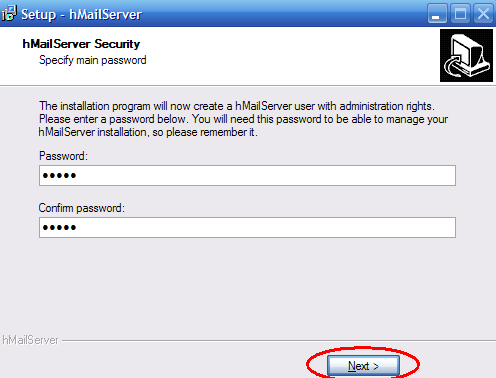
Clipboard01


At the end of the installation, run the administrator tool to setup the server settings:
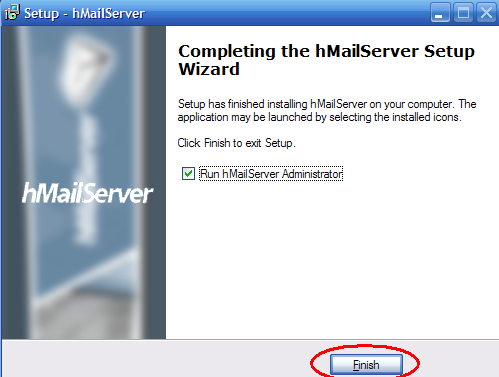
Clipboard02


Hit the connect button to connect to “localhost”:
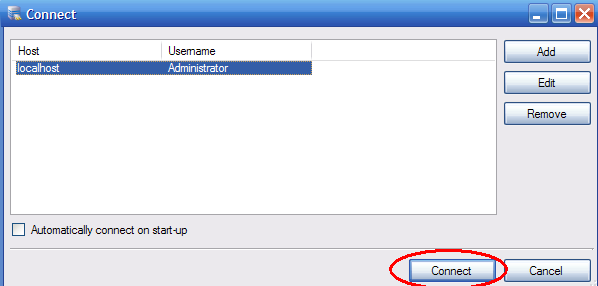
Clipboard03


From the “welcome” section, click “Add domain”:
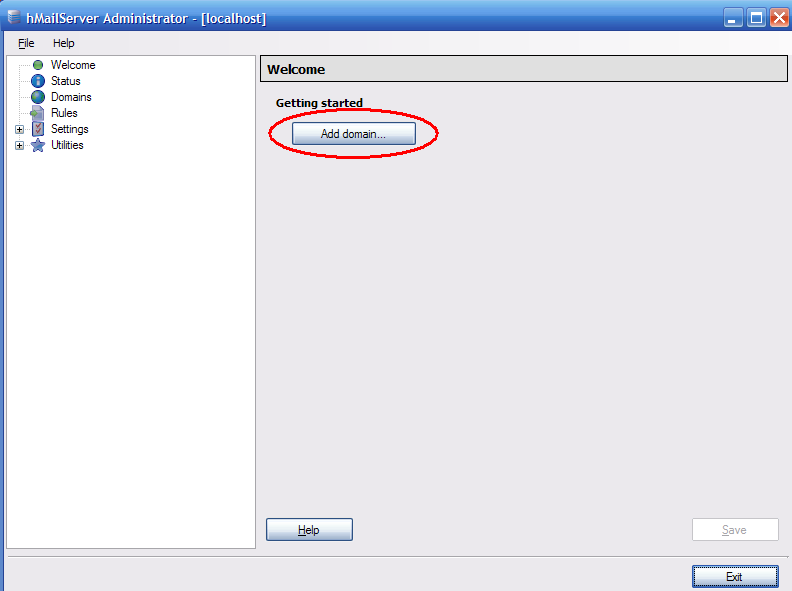
Clipboard04


Enter any domain name (it doesn’t matter, so I pick: local.com), then I click Save:
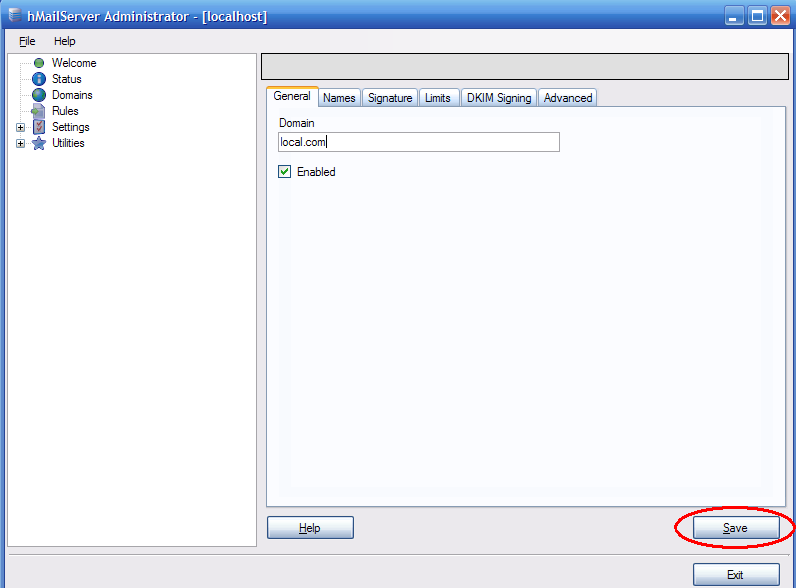
Clipboard05


Then go down to domains -> local.com -> Accounts, and click Add:
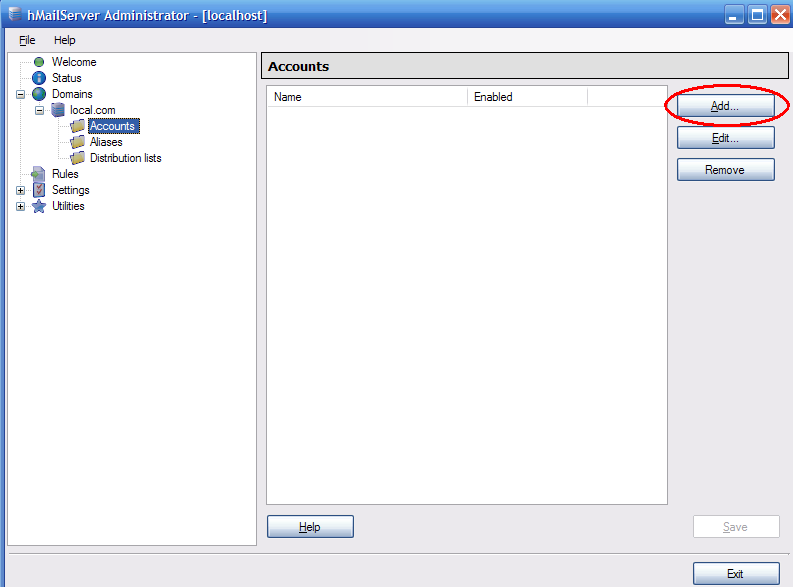
Clipboard06


Create a user, give it a password, and click save (I called it “user”):
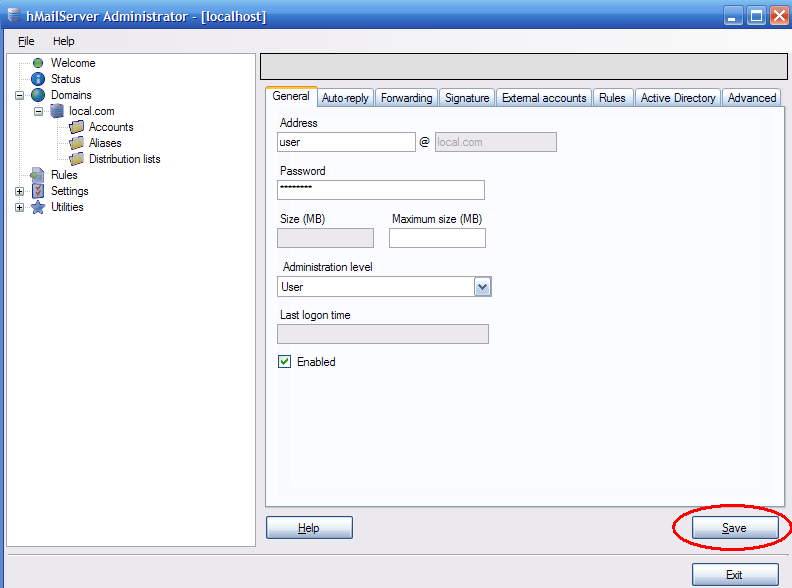
Clipboard07


Initially, I had some problems connecting until I realised I made a few mistakes typing the password, and the server locked the account. So it doesn’t happen again, I disabled the “auto-ban” feature & click save:
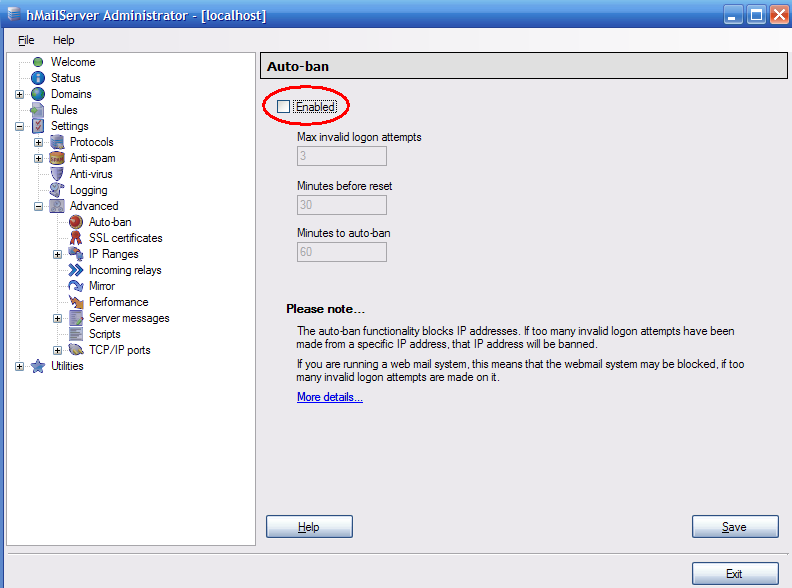
Clipboard08


Now leave the hMailServer admin panel (leave it running in the background if you like, or close it… it won’t matter).

Now we can setup the email client to connect to the new server. In this case I’m using thunderbird, but its a similar process with other email clients. Tools -> Account settings -> account actions -> add mail account:
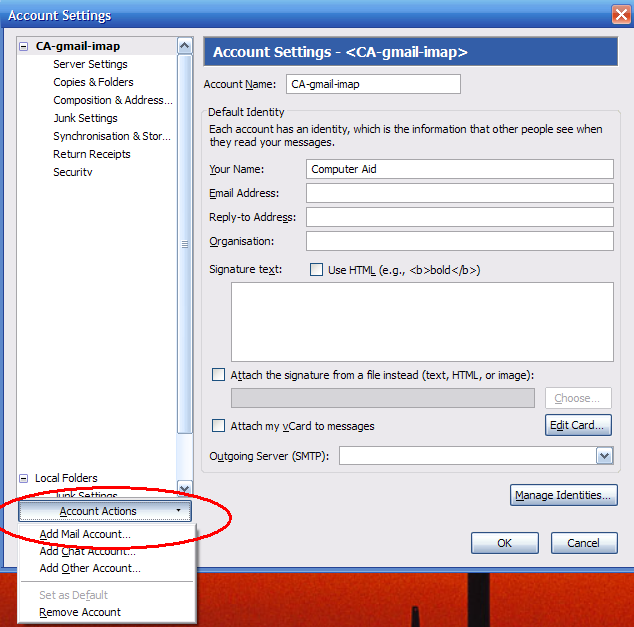
Clipboard09


Enter the details for the server (remember, the password is the one you created for the user account, NOT the one for the server admin)
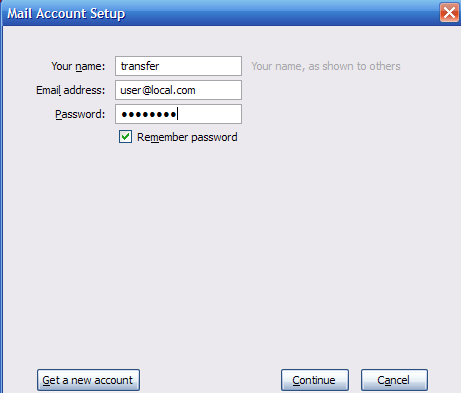
Clipboard10


Thunderbird then goes and tries to find this fake server, so I quickly have to hit the manual config button to stop the auto-config:
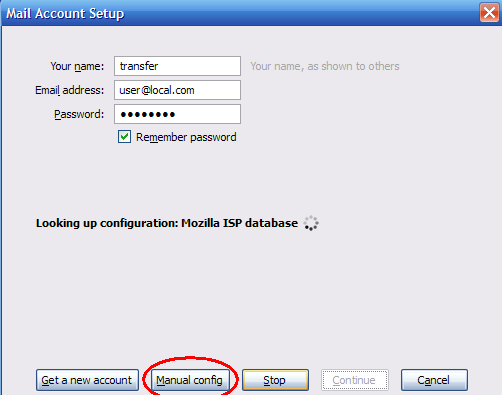
Clipboard11


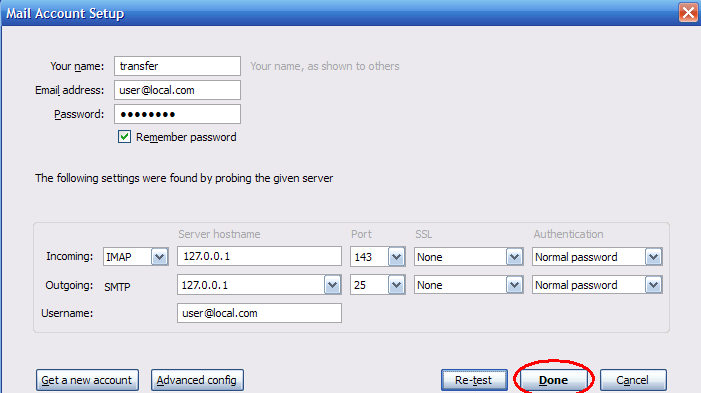
Now I can enter the correct details for the server. Notice the server hostname is 127.0.0.1 (ie it will only look at the local PC). Hit re-test, and it will find the correct settings for the local server:
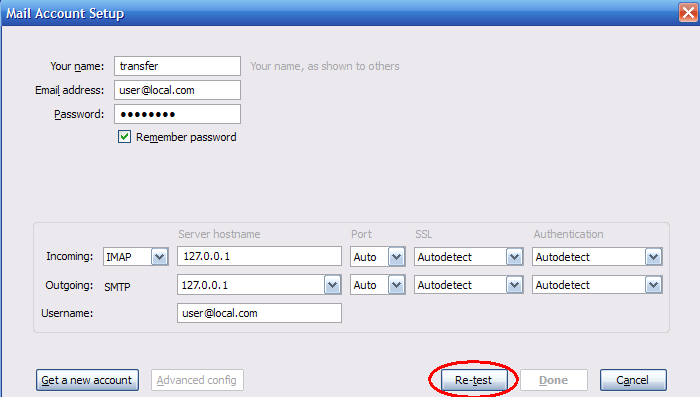
Clipboard12


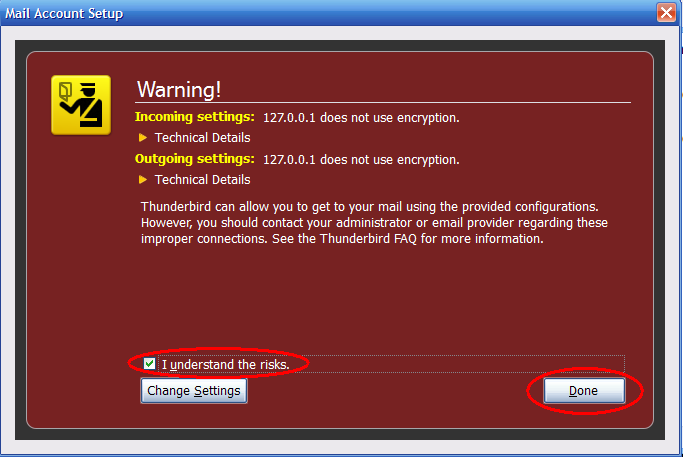
Now you can click the “Done” button:

Clipboard13


You might get a scary-looking warning. Don’t worry, unless you doing this at an internet cafe, or via some other public internet connection (eg McDonalds):
Clipboard14


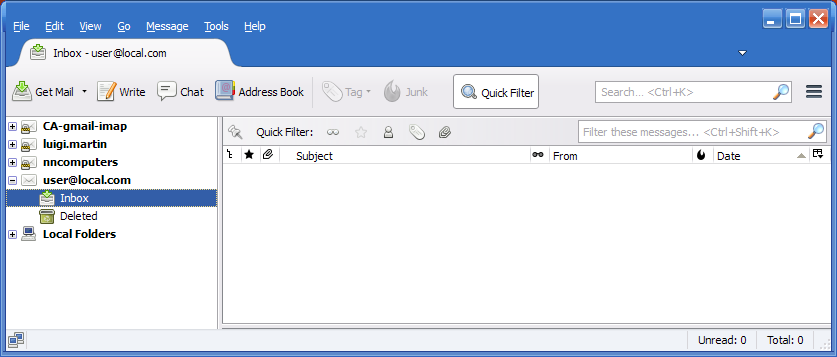
Hey, look, thunderbird now has an extra “user@local.com” account. You can now copy all your folders and emails from your standard email account to the local.com account… and its a LOT faster than using an internet IMAP server.
Clipboard15

Once you finish copying the emails, setup a similar account on your new email client (eg Microsoft Outlook), and then copy the emails from the local.com account to the new (presumably empty) email account.

Once the copy is complete, you can remove the local.com accounts from both email clients… restart them and double-check that you actually did copy the old emails correctly.

You can then uninstall hMailServer… but to be safe, I’d wait a week or two.

Posted in Technical | Tagged hmailserver, imap, outlook, thunderbird, transfer

Manually restoring corrupt windows 7 registry files

Computer Aid Posted on 21 March, 2013 by Luigi Martin1 March, 2015

Its happened twice that I’ve received a non-starting windows 7 PC, only to find no hardware problem, and it quickly becomes obvious that the windows 7 registry has become corrupt, and windows 7 recovery is not smart enough to restore the registry.

And in typical Microsoft style, system restore also fails to work.

But I’m used to doing this in XP, where the registry backups are stored in C:\System Volume Information, and its a simple matter to copy and rename the 5 registry files back to c:\windows\system32\config

But Microsoft (in their typical “change for the sake of change” attitude) have decided to move it somewhere else.

I found some mention of a single copy of the registry files in c:\windows\system32\config\RegBack

But that doesn’t help if the backup also gets corrupted.

So far, I’ve been lucky that the copy in the RegBack folder has managed to fix the system… but its a concern to go from automatic multiple registry backups (with windows XP), to a single backup with windows Vista, Windows 7, and presumably Windows 8 )… A decrease in reliability, for no noticeable benefit.

Posted in Technical | Tagged manual, registry, restore, windows 7

has Exitjunction improved?

Computer Aid Posted on 11 March, 2013 by Luigi Martin11 March, 2013

As many of you know, I tried exitjunction back in 2009, with disastrous effects.

This moring, I received an email from David Johnson, from DynamicOxygen (parent company of ExitJunction)… he said:

Hi Luigi,

I came across your review of our product ExitJunction
http://www.computer-aid.com.au/blog/2009/03/20/exitjunction-yahoo-google-and-adsense/
and just wanted to drop you an email.

I read your experience with ExitJunction and not really sure what happened
in your case in 2009 but I can tell you that I been with ExitJunction for
the past 14 month and never ever heard anything like that from any of our
publishers! We currently work with thousands of publishers and our service
continues to grow as can be seen from our traffic stats
http://www.alexa.com/siteinfo/exitjunction.com

I would like to ask you to place ExitJunction code on just few pages of
your site and see it for yourself that we don’t in any ways affect your
Google Rankings… I would hope that after seeing it for yourself you would
remove your negative review of ExitJunction since at current time the
information stated in your review dosent reflect the reality of our
product! If you have any questions please feel free to get in touch with
me and once again I fully stand behind our product experience since
nothing like that ever happened in the past 14 month I been with the
company…

thanks,

David Johnson
Client Services Manager
Dynamic Oxygen, LLC.
646 Maple St. STE 2B
Brooklyn, NY 11203
Office: (212) 937-7999
Fax:    (718) 228-5224
davidj@DynamicOxygen.com
http://www.DynamicOxygen.com

So my reply was:

Hi David,

Thanks for contacting me.

I find it highly unusual that you have never heard about the problems with exitjunction, as the internet is full of reports about google traffic drying up after exitjunction is applied to existing websites. But then you work for DO/EJ, so I’d expect you to say that.

Your traffic stats really don’t show much improvement (hovering around the 20,000 mark):

Given the very frightening effect of using exitjunction in 2009, I am very, very reluctant to try it again.

If I start seeing reviews (by others who have no affiliation with EJ/DO) who report no ill-effect with their google rankings, then I will consider trying it again… if that happens, I will not try it on a few pages, but on the whole site, to do otherwise will give useless results.

My understanding is that Google will penalise anyone who tries to influence or alter the way someone naturally uses google… so if Google themselves state that they will not penalise the likes of EJ, then I will seriously look at it again.

Otherwise I really don’t have the time & energy to test EJ again, unless I believe that google will not do what they did back in 2009.


So, has anyone else received a similar email saying: “trust us, we are actually good people, and have always been good, and what happened to you must have been something from before 2012”?

And has anyone tried EJ (or DynamicOxygen) recently, particularly if you have some stats on Google traffic before and after using exitjunction?

Let me know, as I’d be interested to see if google will now allow EJ to operate unhindered.

Posted in Technical | Tagged exitjunction

Acer cashback offer is really not worth it

Computer Aid Posted on 6 February, 2013 by Luigi Martin6 February, 2013

About 6 years ago, I took advantage of a laptop cashback offer.

After about 1 month, I got a cheque in the mail, and I was happy camper.

About 3 months ago, I had the need to make use of an Acer cashback offer for a laptop.

I assumed that it would be a similar process… but no, it was worse.

Obviously, the 3 month delay is the first problem… Particularly when these offers seem to have restrictions like “offer must be completed by “this” date, and offer must be complete “X” days after purchase…

Then, instead of getting a cheque, I get an EFTPOS card

So, looking at the info I was sent, I can see further restrictions:

  • Card is valid for 12 months from the activation date
  • Card cannot be used at ATMs to withdraw cash (presumably, I can buy something from a supermarket and get cash-out… but I’m not sure
  • Card cannot be topped-up, or merged with another card

So now I’m looking at finding a way to spend all the money on the card, and not leave a few dollars.

I can try the cashout option (but it might not work)

Or the only other alternative is to buy over $49 at the supermarket (The card value is $49), and pay the first $49 from the card, and the remainder in cash.

And the sad thing is this: Acer do not operate the cashback system themselves… the use GiftCardPlanet… who charge Acer: $5.95 postage, $4.95 production fee per card, and a 2% credit card surcharge on the value of the card…

That could mean that my $49 gift card actually costs Acer $60.88

So, let me get this straight: Rather than hire a real person to administer the cashback program, an use cheques, such that a $49 might end up costing acer, say, $55 per $49 cashback, they choose to spend over $60 per $49 cashback offer.. with the extra money going to a “card” company, rather than put that extra money into the “my” pocket. And then make it more difficult for me to actually get the full cashback.

I must say: I really cant be bothered with all this crap… From now on, when I see a cashback offer, I’ll look for the actual cost, and compare actual costs, and just pretend the cashback offer doesn’t exist.

Posted in Rant, Review | Tagged acer, cashback

Windows 8 experiences, and the future

Computer Aid Posted on 19 January, 2013 by Luigi Martin19 January, 2013

Although I haven’t “upgraded” to windows 8 just yet, I have encountered it many times in the real world, with real people using it.

Given that I am technically savvy, I was able to find my way around the OS, and get my work done, but in doing so, I can now see why so many people are avoiding Windows 8

I can understand that microsoft want to push people to using the “metro” interface, but in this case, 2 things are obvious:

  1. The metro interface is still very “unpolished” (ie few apps, many apps do not have the functionality that most people expect, etc)
  2. The classic desktop has been hobbled in such a way, that it keeps trying to force people into the “metro” system.

Now, if the classic desktop was functionally identical to Windows 7 (ie with the start button, and without flicking people into “metro”), then it wouldn’t matter that metro was unpolished… some people with touch screens would still go there, and everyone else would avoid it until it improved, and was worth using.

On the other hand, given how the current classic desktop works, most people probably wouldn’t mind, if the new “metro” system was an awesome feat of functionality and useability (ie like MacOS or IOS, or even Android!).

So, it seems that, with Windows 8, Microsoft have split windows into 2 parts, and have tried to accelerate the move to “metro” by damaging the classic desktop.

My opinion, is that MS have pushed a bit too hard, and they have also underestimated how attached many people are to the start button, and the classic desktop system.

And this is without even considering how the classic desktop is still a wonderfully functional and productive environment.

My prediction for the future:

Microsoft will publicly say that Windows 8 is the best ever… but behind the scenes, they already know that they have another “Vista” on their hands.

So I wouldn’t be surprised if MS is furiously (and urgently) developing Windows 9… mostly in an effort to fix the “problem”.

If common sense prevails, they will probably re-introduce the start button, and minimise the automatic jumps to metro… this would be the quickest and easiest solution, which would only require a Service Pack update to fix.

However, if MS is unable to see the obvious, they they will probably try to tinker with metro, in an effort to make it all things to all people (and fail).

Given the rise in smartphones and tablets over the last few years, I believe that MS have taken a wrong turn, by trying to unify their OS on phones, tablets, and desktops.

The desktop still has its place, so MS should have kept going with a split OS line:

  • Keep evolving windows desktop for power users
  • Run a parallel phone/tablet OS

Since the phone OS wasn’t working well enough, bringing it to the desktop is just asking for trouble.

MS needs to focus on true functionality, so that computers are properly useable, rather than holding on to the idea that you get the most profit by upgrading windows every 2 years.

Posted in Business, Musing, Rant

China is hacking anyone they can

Computer Aid Posted on 2 December, 2012 by Luigi Martin2 December, 2012

About 1 year ago, I had setup a NAS server (Linux-based), for a small company.

I set it all up, including remote access to the admin area, and to an online file manager (so that employees could do some work from home, if needed).

Well, a few days ago, the backups started giving error messages, so while fixing the issue, I also upgraded the firmware, and I was also asked to see if it was possible to track user access to files (eg which file was accessed, and when).

So I enabled the system connection logs, hoping they would show the information needed.

Well, the logs didn’t show what I wanted, but a few hours later, I noticed an unusual number of failed login attempts…

About 25 attempts per minute… and this would continue for about 5 to 10 minutes

They would try typical usernames like “root”, “admin” and “bin”, as well as others.

The really interesting part was when I looked up the country of origin for the logged IP addresses of the hackers:

Most were located in China

Although this particular company didn’t have huge secrets, the server had IP property, which might have been useful to some Chinese companies.

So, it looks like is any company has servers that can be accessed externally, they they will be subject to hacking attempts (and consequently: industrial espionage) from China.

In this case, the solution was easy, The NAS server has a Network Access Protection system, where I can specify if a particular IP address generates more than 5 failed login attempts within 1 minute, then the IP address is blocked from any further attempts.

Some of the IP addresses captured are:

58.215.56.110: China
117.21.208.26: China
117.79.91.55: China
183.136.128.217: China
211.94.161.84: China
114.205.1.149: Korea
117.79.91.209: China
And after implementing the Network Access Protection:
113.163.22.170: Vietnam
65.164.153.141: USA
189.112.236.116: Brazil
217.174.152.147: Bulgaria
85.31.105.66: France
61.234.146.22: China
80.252.241.37: Ukraine
111.74.82.33: China
221.13.34.3: China

Obviously not enough data here, but there are strong indications of Chinese (individuals, or companies, or even Government) involvement in hacking for company secrets.

I’m not exactly sure why lots of different countries started appearing in the hacking logs only after the Network Protection was enabled… but I’ll check again in a few weeks, and see if there is a more definite pattern.

After thinking about this for a few days, my paranoia got the better of me, and I implemented similar security on this blog… The Computer Aid blog represents over 900 blog posts (most personally written by myself), and thousands of hours of work over 7 years… I don’t want to lose it.

Posted in Business | Tagged china, espionage, hacking

Post navigation

← Older posts
Newer posts →

Archives

Categories

Recent Comments

  • Sue Jones on outlook error 0X800ccc0e while sending emails
  • Blair Newmann on AdSmartMedia advertising
  • Private Investigator in GTA on Divorce, consent orders, and superannuation splits: getting the wording correct

Tags

802.11g ADSL amd android bigpond broadband bsod defender dell email exitjunction firefox firewall gmail Google google contacts ie7 infection internet connection ISP laptop Linux m1188a ntldr is missing office 2007 outlook outlook express password power supply problems ram registry repair install sata scam slow telstra thunderbird usb vista wifi windows 7 wireless wordpress xp
Copyright © 2005-2015 Computer Aid
↑