
↓
 

Computer Aid

Ph: 0402 133 866

  • Home
  • Blog
  • Contact
  • Web Services
    • Websites
    • SEO
    • Hosting
    • Domain Names
    • Portfolio
Home→Tags network

Tag Archives: network

windows 7 won’t remember network password

Computer Aid Posted on 5 October, 2013 by Luigi Martin5 October, 2013

A common problem with Linux file-server networks, as well as small-scale home networks.

You try to logon to a remote network system, so that you can get access to a file/folder.

You get asked for your username & password.

You enter the details (if its another windows PC you are trying to access via file sharing (not homegroup), you enter the user / password of the remote Windows user).

You tick the box that say: “Remember my credentials”.

Everything then works well until you re-start the PC.

Then you find Windows didn’t remember your credentials, and you need to enter the username / password again!

And there is nothing obvious you can do to fix the problem.

Here is how to fix it:

On the computer that keeps forgetting:

Start -> Control Panel -> User Accounts -> Credential Manager ->If you see your login details at this point, they have probably been saved incorrectly, so click on the incorrect details, and it will expand, so that you can click “remove from vault”
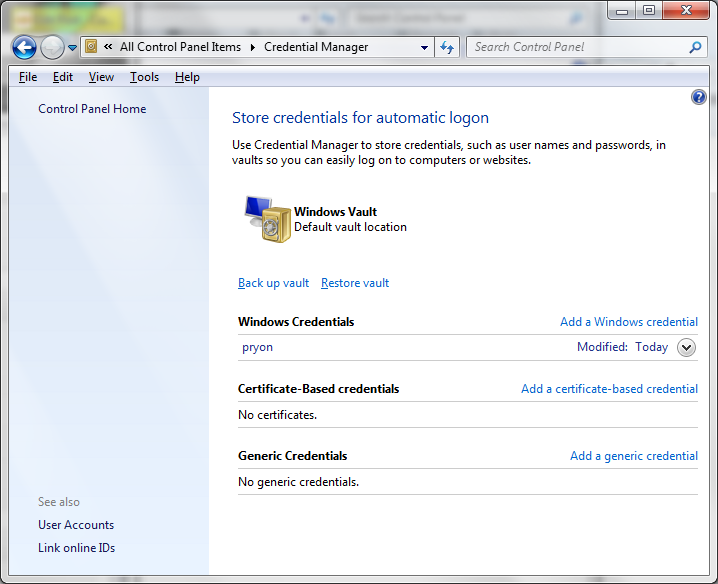
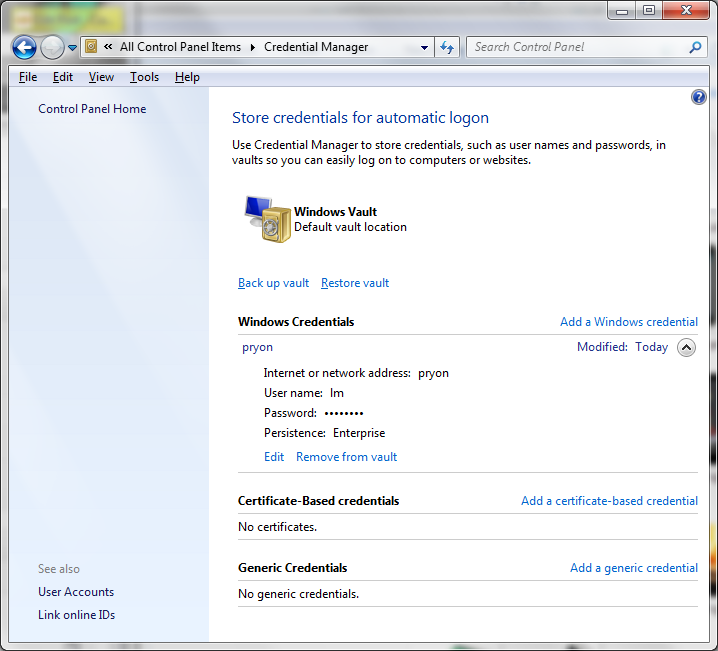
cred1cred2

Now click on “Add a windows credential”

enter the remote computer / server name, the username, and the password, then OK.

Now restart the computer, and you can connect to the remote PC/server without the hassle of entering the details every time.

Posted in Technical | Tagged forget, network, password, windows 7

Window 7 and a HP PSC1410 printer

Computer Aid Posted on 1 January, 2010 by Luigi Martin1 January, 2010

I had an unusual situation with windows 7 64 and a HP PSC1410 printer.

There are 2 networked computers:

An older XP PC with the HP PSC1410 attached via USB, and a newer PC running windows 7 64 bit.

So I do what I have done in the past:

  • Make sure both PCs are part of the same workgroup.
  • Share the HP printer.
  • From the W7 PC, I add the shared networked printer. But that doesn’t work, since the XP PC cannot deliver the W7 printer drivers to the W7 PC.

At this stage, the obvious step is to download and install the W7 software from the HP website.

So I run the install software, and I’m told to connect the printer to the USB port…

Is there an option to find the printer over the network? No.

Is there an option to install the driver anyway, and connect the printer later? No.

So now I have to disconnect the printer, carry it back upstairs to the W7 PC, install the driver software (and connect the printer when I’m told (Grrr).

When the install process is complete, I disconnect the HP printer, carry it downstairs again, connect it to the XP PC, again…

Finally, I can use W7 to install the shared PSC1410 printer as a networked printer.

Now, wouldn’t it be nice if HP could provide software thats a bit more flexible, or maybe Windows 7 needs to be a bit smarter at finding drivers?

Posted in Technical | Tagged network, psc1410, windows 7

MYOB Premier is slow over a network

Computer Aid Posted on 8 October, 2009 by Luigi Martin8 October, 2009

Now this was difficult to solve.

Customers’ accountant had upgraded to MYOB Premier, so that it should run over the network, and be accessed by 2 or 3 different PCs (Although it was still going to be used mainly from just 1 PC).

I get called a few weeks later, and get asked to look into the “server” because MYOB is running slow, and sometimes just wouldn’t even open the database file.

Apparently, the accountant had said she had setup MYOB Premier in many different environments, and she had never encountered any speed problems… in hindsight, I shouldn’t have trusted this nugget of useless information.

Since the server was just a windows XP home PC (but a reasonably quick Acer 3.2Ghz P4 system), I ended up doing a lot of stuffing around creating a “proper” server, only to find that the new environment had created other difficult issues (see my previous post on using linux as a file and print server).

In the end, I found a few things that resulted in a solution:

  • When MYOB starts, I changed the default protocol from NetBeui to TCP/IP (some say NetBeui is faster, but at that stage, I was willing to try anything).
  • Both the server and the main MYOB PC had Gigabit network cards, but the router ran at 100Mbit… I installed an Asus Gigabit switch between the server and the wired PC, so they would run at full Gigabit speeds.

After that, MYOB seemed to run “reasonably”, and with none of the original problems.

After some further research, I found that MYOB (probably because its not efficient at working over a network) can shuffle huge amounts of data across the network… so running Gigabit would have helped a lot.

I suspect that the amount of data transferred might be related to the size of the company database… and in this case, the company file was reasonably large (about 30 Mb).

A difficult problem to solve, and for the first time: a customer that wasn’t happy about the “size” of my invoice… But that’s another story.

Posted in Technical | Tagged MYOB, network, slow

Archives

Categories

Recent Comments

  • Sue Jones on outlook error 0X800ccc0e while sending emails
  • Blair Newmann on AdSmartMedia advertising
  • Private Investigator in GTA on Divorce, consent orders, and superannuation splits: getting the wording correct

Tags

802.11g ADSL amd android bigpond broadband bsod defender dell email exitjunction firefox firewall gmail Google google contacts ie7 infection internet connection ISP laptop Linux m1188a ntldr is missing office 2007 outlook outlook express password power supply problems ram registry repair install sata scam slow telstra thunderbird usb vista wifi windows 7 wireless wordpress xp
Copyright © 2005-2015 Computer Aid
↑