
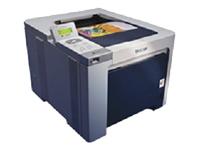
I have a brother HL-4040CN colour laser printer, and it just started saying that ALL 3 colour toner cartridges had run out (and would refuse to print)
Now, I know I print more yellow than any other colour, so telling me that all 3 need to be replaced it just a lie!
I find out that the cartridges that I use are compatible with the following numbers: TN-115, TN-135, TN-155, TN-175
I had a look at the cartridges, and on the side, is a small circular “window” of clear plastic, where I assume the printer shines a light, to see if it gets to the other side (and then guess how much longer the cartridge will last before it actually runs out.
Obviously their guess is wrong (and I suspect its deliberately wrong… for financial reasons… it means Brother gets to sell more toner).
This is particularly annoying, when I see the clear window is half way between the top and the bottom of the cartridge.
 So after a bit of searching, I find a way to trick the printer into using all the toner:
- Place a small piece of dark electrical tape over the clear window. Don’t use anything clear or shiny, as the printer might receive a “false empty” signal. I just did it to all 4 cartridges… even the black one that still had plenty of toner.
- With the front cover still open, press and hold the “cancel” button.
- while holding the cancel button, press the reprint button.
- You should now see Reset Parts Life menu in the LCD screen.
- Use the up/down arrow to select the cartridge life you want as follow:
- B.TNR-S = Black standard toner
- B.TNR.H = Black high-yeild toner
- C.TNR-S = Cyan standard toner
- C.TNR.H = Cyan high-yeild toner
- M.TNR-S = Magenta standard toner
- M.TNR.H = Magenta high-yeild toner
- Y.TNR-S = Yellow standard toner
- Y.TNR.H = Yellow high-yeild toner
So I reset all colours to high-yeild, and now I can use the printer until all the toner is truly finished.
I close the front cover, and I can now print again.