
It’s been a long while since I’ve contributed to this blog, but I’ve been busy providing IT support services to businesses in Sydney.
Ever wanted to pin a drive to your task-bar? You might have noticed that doing so would not give the drive its own icon, but rather would add it to the list of available locations in the Explorer icon as per the image below.

As always, there is a neat little workaround that can achieve this.
1. First of all, right-click on your desktop, click New, then click Text Document.
2. Right-click the document you just created and rename it, adding .exe to the end of the file name. You will be prompted with a confirmation box as per below – click Yes.
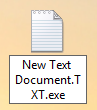

3. Drag this newly renamed file to your taskbar and it will be pinned as an application.
4. The key step is to now modify the icon on your taskbar by right-clicking on it, and again right-clicking on the filename that shows up in the menu, then click properties.

5. Now you will be in the properties box. The key step here is to change the Target, and optionally the name of the shortcut. As per below, simply change the text in the Target box to whichever drive name you wish the icon to point to. In my case, I wanted it to point to drive F:
6. To change the shortcut name is very easy. Just click the General tab at the top and type in the new name. Changing the icon requires is unfortunately not easily doable.
Don’t forget, if you’re in need of some technical support when you’re next in Sydney, keep Cloud B in mind, our website can be found here.