
↓
 

Computer Aid

Ph: 0402 133 866

  • Home
  • Blog
  • Contact
  • Web Services
    • Websites
    • SEO
    • Hosting
    • Domain Names
    • Portfolio
Home→Tags windows

Tag Archives: windows

How to Pin a Drive to Your Taskbar

Computer Aid Posted on 29 August, 2012 by jjfiasson29 August, 2012

It’s been a long while since I’ve contributed to this blog, but I’ve been busy providing IT support services to businesses in Sydney.

Ever wanted to pin a drive to your task-bar? You might have noticed that doing so would not give the drive its own icon, but rather would add it to the list of available locations in the Explorer icon as per the image below.

As always, there is a neat little workaround that can achieve this.

1. First of all, right-click on your desktop, click New, then click Text Document.

2. Right-click the document you just created and rename it, adding .exe to the end of the file name. You will be prompted with a confirmation box as per below – click Yes.
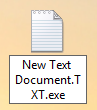
3. Drag this newly renamed file to your taskbar and it will be pinned as an application.

4. The key step is to now modify the icon on your taskbar by right-clicking on it, and again right-clicking on the filename that shows up in the menu, then click properties.

5. Now you will be in the properties box. The key step here is to change the Target, and optionally the name of the shortcut. As per below, simply change the text in the Target box to whichever drive name you wish the icon to point to. In my case, I wanted it to point to drive F:

6. To change the shortcut name is very easy. Just click the General tab at the top and type in the new name. Changing the icon requires is unfortunately not easily doable.

Don’t forget, if you’re in need of some technical support when you’re next in Sydney, keep Cloud B in mind, our website can be found here.

Posted in Tutorial | Tagged taskbar, windows

Windows still doesn’t clean up its temp files

Computer Aid Posted on 2 August, 2009 by Luigi Martin2 August, 2009

If you believe Microsoft, something as modern as Vista should be a shining model of efficiency.

Well, I recently found an example of inefficiency that seems to go back to the days of windows 95 (or maybe even earlier).

Yep, I’m talking about the temp folder(s).

As Microsoft has waded through the various versions of Windows, the location of the temp folder (or folders) has changed, but the lack of housecleaning hasn’t.

With Vista, I recently got a slow laptop from a customer, and I decided to take a look at:

c:users{username}appdatalocaltemp

And what did I find?

over 4,000 temp files… some over 2 years old.

Sure, you can install something to cleanup the temp files, but average computer users don’t know about computer maintenance… they just assume it get done automatically.

Its amazing how a company will put so much effort (and money) into advanced new features… yet some simple maintenance like cleaning the temp folder at startup time, is totally ignored.

Out of curiosity, I took a look at the latest Windows 7 beta… and it also has the same issue…

It makes me wonder if anyone at Microsoft actually cares about the long-term usability of their windows products.

Posted in Rant, Technical | Tagged cleanup, temp, windows

Archives

Categories

Recent Comments

  • Sue Jones on outlook error 0X800ccc0e while sending emails
  • Blair Newmann on AdSmartMedia advertising
  • Private Investigator in GTA on Divorce, consent orders, and superannuation splits: getting the wording correct

Tags

802.11g ADSL amd android bigpond broadband bsod defender dell email exitjunction firefox firewall gmail Google google contacts ie7 infection internet connection ISP laptop Linux m1188a ntldr is missing office 2007 outlook outlook express password power supply problems ram registry repair install sata scam slow telstra thunderbird usb vista wifi windows 7 wireless wordpress xp
Copyright © 2005-2015 Computer Aid
↑