↓
 

Computer Aid

Ph: 0402 133 866

  • Home
  • Blog
  • Contact
  • Web Services
    • Websites
    • SEO
    • Hosting
    • Domain Names
    • Portfolio
Home→Author Luigi Martin - Page 6 << 1 2 … 4 5 6 7 8 … 78 79 >>

Author Archives: Luigi Martin

Post navigation

← Older posts
Newer posts →

google 404 redirect nginx

Computer Aid Posted on 4 June, 2012 by Luigi Martin4 June, 2012

This computer had an interesting problem:

You could visit most websites, except for google and youtube.

When you go to google.com, you get a 404 error, and then, underneath, in small writing: nginx

Also: system restore would not work.

A scan with malwarebytes removed a few infections, but the google problem persisted.

A search uncovered a few possible solutions:

  • Make sure the hosts file at: C:windowssystem32driversetc only has one entry (127.0.0.1 localhost)
  • go to: internet settings -> connections -> lan settings -> make sure no proxy settings are ticked
  • make sure the internet dns settings are obtained automatically
  • use tdsskiller to remove hidden rootkits

In my case, malwarebytes fixed everything… but I still needed to use tdsskiller to fix the problem with google (which was caused by a rootkit).

I wonder if malwarebytes is capable of detecting and removing rootkits?

Posted in Technical | Tagged 404, Google, nginx, tdss, tdsskiller

Career77.com and workvictory.com another scam alert

Computer Aid Posted on 28 May, 2012 by Luigi Martin28 May, 2012

If you are looking for work and you get an email that begins with:

Thank you for your recent submission for a role at Employed Success.

To progress your submission further, you must finish an Online Assessment. This has to be completed within the next 7 days in order for your submission to get consideration for roles with Employed Success.

Then my advice is: don’t bother. Just move it into your spam folder and move on.

Its actually a variation on the: Work At Home Mom Makes $6,397/Month Part-Time

They say you make the money from google, but I doubt it.

My website and blog make me about $40 per month, and thats after 7 years of blogging (about 850 blog posts to date), so your chances of making 100 times as much depends on what kind of interesting / depraved / wacky nonsense you can serve up, in the hopes that it goes “viral”. Just because 1 person got lucky and got millions of hits on their youtube video of their pet rock which suddenly developed the ability to play chess, doesn’t mean you will too.

Posted in Hints, Rant, Review | Tagged career77, scam, workvictory

Sometimes, old software is better than new (teklynx labelview 6.02)

Computer Aid Posted on 21 May, 2012 by Luigi Martin21 May, 2012

I’ve had this happen a few times in the past, and again, just a few days ago.

Customer had some labeling software that they purchased maybe 10 years ago.

Yes, they realise its very old, but it does the job, and they are happy.

The software is Teklynx labelview XLT+ V6.02 beta 1 R, connected to a Tec b-day443 label printer via a parallel port. Its all running on an old XP PC (although I wouldn’t be surprised if it was originally running on a windows 98 PC).

The customer was worried that the computer was about to die, and they didn’t have the original installation disks (they might have been floppies).

So I decide to take a look, and see if the software was old enough, that it could just be copied to a new PC without needing a re-install to alter the registry settings.

The software, including many years-worth of labels, was only 35Mb, so it looked promising.

After a quick copy to a newer XP PC, the labelview software started without a hitch, and was able to print to a newer USB laser printer.

For a bit of extra peace of mind, I also copied the software onto my office PC, and to my dropbox, so that there is little chance of losing it again.

So there you go: there are some advantages to using old software that is unaware of the windows registry.

Posted in Technical | Tagged labelview, teklynx, v6

Divorce, consent orders, and superannuation splits: getting the wording correct

Computer Aid Posted on 14 May, 2012 by Luigi Martin6 December, 2017

Here in Australia, the processes of getting a divorce and sorting out the split of property, is supposed to be getting easier (for those of us who don’t want (or cannot afford) lawyer fees.

Having just ended a 2+ year process of getting a divorce & a consent order (property settlement), I can see that the scales are still weighted in favor of guiding people away from a DIY solution.

I persisted, and with a fair amount of digging, managed to do it on a minimal budget.

First the usual disclaimer:

  • I’m not a lawyer, so don’t blame me if what worked in my specific situation doesn’t work for you.
  • This only works if both parties are in agreement on the split. If there is no agreement, then lawyers are the only way to go (unfortunately).

In my case, my ex did start getting lawyers involved, assuming I would just agree to whatever they proposed. After strongly disagreeing with a very unfair (for me) series of proposals, she eventually realised that the best results for everyone was to actually talk to me, and come to a mutually agreeable solution.

By that stage, I had taken a gamble and actually filed for divorce in Brisbane. Once someone starts divorce proceedings, the other party cannot normally stop the divorce. The gamble was: once the divorce was final, there was then a 12 month time limit on completing the consent order. If she delayed, then someone was going to have a major inconvenience (eg she could be forced to pay half the mortgage, which I was now paying… but then she could also move back in and claim half the living area… or she could force a sale of the house, to resolve any outstanding equity in the house).

Getting a divorce is actually quite easy, but it should be done after a consent order.

In the end we decided that I would get the house (and a considerable mortgage), while she would get a large chunk of my superannuation.

They say you can do it yourself, but then you get strongly pushed to get legal advice at every turn.

I ignored the “suggestions” to get legal advice… I can be stubborn sometimes. But I also got free (but limited) advice from real lawyers at community centres on many occasions… they won’t do anything for you, but they can point you in the right direction.

In the end we kept our son out of the consent order (it removed many complications), and so we just split the household effects, the 2 cars, the super, and the house itself.

The wording of the actual consent order was mostly straightforward (I can write legal-sounding stuff without too much trouble).

But splitting the superannuation ended up being the biggest problem.

It turns out you must give the super funds involved, 30 days notice of how you are going to split the super, and if the wording of the split is not “correct” (ie it must not make sense to a normal human), then they (in this case, Australian Super) will reject it.

You must get the super fund to agree in writing that they do not object to the split (and send them a “form 6” so that they can legally disclose how much money is in the super fund), before you file the consent order to a magistrate.

In the end, these are the orders that were approved (I’m publishing them here, in the hope that they will help minimise frustration for someone else in a similar situation)

The main part goes like this:

CONSENT ORDERS

BY CONSENT IT IS ORDERED

  1. That the applicant will retain ownership, all interest and liabilities in the business “XYZ Widgets” and the respondent relinquishes any claims in relation thereto.
  2. That the applicant will retain the family home at 2 Divorce Court, Deception Cove, VIC 7654, (the Home), and will also be fully and solely responsible for any mortgages, debts and Lines Of Credit, related to the Home.
  3. That the respondent fully relinquishes the family home at 2 Divorce Court, Deception Cove, VIC 7654, (the Home) and all associated liabilities, and is obliged to sign any relevant documents relating to relinquishing ownership and refinancing of the Home, within 30 days of receiving said documents. If a signature cannot be obtained within 30 days, then the court will be authorised to sign on behalf of the respondent.
  4. That the respondent will retain the red 1965 Hyundai Getz 5 door hatch.
  5. That the applicant will retain the white 1966 Hyundai Getz 3 door hatch.
  6. That the respondent will retain all furniture, appliances, and any other goods that have already been removed from the family home at 2 Divorce Court, Deception Cove, VIC 7654.
  7. That the applicant will retain all furniture, appliances, and any other goods that are currently at the family home at 2 Divorce Court, Deception Cove, VIC 7654.
  8. That in accordance with section 90MT(1) ( b ) of the Family Law Act 1975, (the Act), whenever a splittable payment within the meaning of section 90ME of the Act becomes payable to or on behalf of Basil Bushy from his interest in his Australian Super Superannuation account, Sandy Beach Bushy is entitled to be paid (by the Trustee of Australian Super) the amount calculated in accordance with Part 6 of the Family Law (Superannuation) Regulations 2001, using a base amount of $25,000 and there is a corresponding reduction in the entitlement that Basil Bushy would have had but for these Orders.

The Superannuation Fund responsible for the split of funds will be Australian Super. The applicant currently has funds with Australian Super (account number 123456789). The respondent currently has funds with Australian Super (account number 987654321).

 The operative time for order 8 is: 4 business days after the service of the final orders on the trustee.


Notice the weird wording of part 8 (which just means please transfer $25,000 from Basils super account, to the super account of Sandy Beach Bushy).

Also note that in part 3: the party thats giving up ownership of the house cannot stall or delay the transfer of house ownership by refusing to sign… as the court can now sign on behalf of the recalcitrant party.


Posted in Musing, Rant, Tutorial | Tagged consent orders, divorce, superannuation, wording

Great ADSL internet plans

Computer Aid Posted on 7 May, 2012 by Luigi Martin7 May, 2012

This one will only apply to people who live in Australia.

I don’t often advertise goods and services for other companies, but after 7 years with the same ISP, and having helped many people with changing their current plan to a much cheaper one, all without asking for anything in return, I decided to become a TPG reseller.

I’m hoping to generate a small amount of revenue from being a reseller, but my main aim is to let you know that I’m so happy with my own personal experience with TPG over such a long period, that you can genuinely save a lot of money by switching to TPG.

I regularly look around for cheap internet plans, but in the last 7 years, I’m yet to find a company that provides a better value internet service than TPG.

Since I do a lot of my work on the internet, and I also design websites, I find I spend most of my time on the internet… probably more that most people.

Yet it might surprise you to find that I am using TPGs cheapest internet plan at $29.99 per month

For that, I get 50GB per month, which I rarely exceed. And on top of that, the 50GB is actually split into 25GB peak, and 25GB off-peak… So I rarely exceed 25GB per month during normal daily hours.

And the internet is used by 3 active PCs, 2 mobile phones, and a few android tablets.

Now, if you want to check out the details, go to:

Great value internet plans

Please note:

What you pay will be the same, regardless of whether you go to TPG directly, or if you signup via my reseller links, except:

  • with TPG direct, TPG gets to keep all your money
  • with me, you will be helping out a struggling computer repairer (me)
Posted in Business, Hints, Review | Tagged internet, ISP, value

Amazing mobile phone plans

Computer Aid Posted on 30 April, 2012 by Luigi Martin30 April, 2012

OK, this one will only apply to people who live in Australia.

I don’t often advertise goods and services for other companies, but after 7 years with the same ISP, 2 years with the same ISP for my mobile phones, and having helped many people with changing their current plan to a much cheaper one, all without asking for anything in return, I decided to become a TPG reseller.

I’m hoping to generate a small amount of revenue from being a reseller, but my main aim is to let you know that I’m so happy with my own personal experience with TPG over such a long period, that you can genuinely save a lot of money by switching to TPG.

Honestly: when I first found out that TPG had mobile phone plans, I was skeptical (I was with Virgin at the time).

At the time, there were 2 companies that I did not trust: Dodo and Soul (due to very bad customer service)

And TPG purchased Soul… So I decided to stay away from TPGs mobile phone offerings for about 2 years.

I eventually noticed that they had a $15 per month plan, that seemed similar to my Virgin $29 per month plan (both use the Optus Mobile Network)

When I looked more closely, I found it was actually MUCH better.

$550 of calls per month, 1.5GB of data per month (so I could actually use my android phone as a modem if I really wanted to).

So I tentatively tried 1 of my phones, and didn’t have a single problem.

There were no unexpected “gotchas”, and no need to worry about going over my call or data limits.

I then decided to get a phone for my 9 year old son, and try out the TPG $1 per month plan.

I figured that there had to be some sort of catch with this one… most likely the calls and SMS TXT messages would be much more expensive (per minute), compared to other plans.

Instead it was just the opposite: 9.9¢ TXT messages, and phone calls were 10¢ flagfall and 9.9¢ per minute. How good is that!

I now have 3 phones with TPG, and I’m paying a total of $31 per month (actually a tiny bit more, as the $1 plan sometimes involves paying an extra $1 or 2, and calls are made).

Now, if you want to check out the details, go to:

Cheap mobile phone plans

Please note:

What you pay will be the same, regardless of whether you go to TPG directly, or if you signup via my reseller links, except:

  • with TPG direct, TPG gets to keep all your money
  • with me, you will be helping out a struggling computer repairer (me)

If you are also looking for a good, and inexpensive android smartphone, I also sell those.

Posted in Business, Hints, Review | Tagged cheap, mobile phone plans, sim plans

mobile phone with built in projector

Computer Aid Posted on 23 April, 2012 by Luigi Martin23 April, 2012

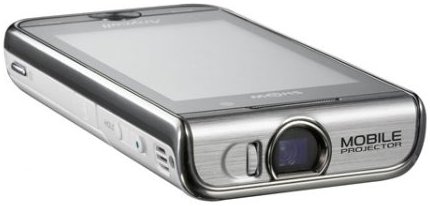
While looking at various smart phones from chinese suppliers, I stumbled across an interesting mobile phone:

A phone with a built in wall projector.

My immediate reaction was: its probably impractical

If its like a traditional projector, it would get really hot, and the battery will probably run flat within a few minutes.

However, after some research, I found that Samsung have developed (and some chinese has copied) an LED based phone projector.

I wasn’t surprised about the size of the phone (it was bound to be thicker than most phones), but I was amazed that battery life while using the projector is (apparently) 3 hours!!!

And since the projector actually uses LEDs instead of Halogen globes, then you never need to replace the projector globe.

Having viewed a few videos of this device, I have noticed a minor shortfall: the brightness of the projected image seems lower than what you would expect from a “normal” projector.

After over 25 years in technology, there is not much new technology that surprises me anymore… It all become game of slight improvements, playing copycat, and the occasional new idea, so its not often that I see a product, where I can see a huge leap in technology (and the future possibilities) such that I think: “wow!”. But I think this is a great innovation.

Posted in Technical | Tagged phone, projector

Many people cannot type their paypal email address

Computer Aid Posted on 19 April, 2012 by Luigi Martin19 April, 2012

I’m supplying an abandoned accounting package called erecord, for a small fee of $14 (payable via paypal).

Over the last 2 years, I have had many hundreds of people download erecord.

And I am totally amazed at how many people just cannot do a simple task like type in their email addresses ( about 25% get it wrong ! ! ! )

What usually happens is: I get an email that someone like joe123@gmail.com has just purchased erecord.

Since the software is fully automated, I know that this person will get an email that gives them instructions on how to download erecord.

Then, after a few days/weeks, I sometimes get a brief email from the customer, saying something like:

I purchased erecord on date xyz

I have yet to receive the download instructions. Send me the download instructions ASAP

First off, I check that they actually paid: and often I find that the automated confirmation email I got was from, say, joe123@gmail.com, yet the “wheres my download” email might be from joe124@gmail.com

This is a simple (yet amazingly common) typing error. To correct it, I ask the customer to confirm their payment details, and then I send the download email to the new email address (and updating my website database with the new address)

Other times, its worse: the email arrives from joe.blue@yahoo.com, and the customer has lost all access to the old email in their paypal account.

That means that they have some serious problems with their paypal account, that needs fixing before it becomes a security risk.

However, I can still send the download email to the “new” email.

I’m still surprised at how often people make typing errors while doing financial transactions over the internet.

I’d hate to think what would happen if people had to enter the payment amount manually… id get payments varying from $0.14 upt to $1400 !!!


Posted in Technical | Tagged email, paypal

Event id 2017. The server was unable to allocate from the system nonpaged pool because the server reached the configured limit for nonpaged pool allocations

Computer Aid Posted on 12 April, 2012 by Luigi Martin1 March, 2015

A local business upgraded their main PC to Windows 7 Pro, 64 bit, and shortly after, upgraded their main software suite.

Everything seemed to work OK, but after a few weeks, I started to get called about strange errors:

  • Sometimes the backup would fail to copy backup logs from a second PC over the network
  • Sometimes the second PC would just refuse to run the software suite.

The errors seem to point at a network outage, but after replacing the Ethernet cables, I was starting to suspect the ethernet hub.

Before committing to a hardware upgrade, which might or might not work, I decided to trawl through the windows event viewer, looking for any hints to the problem.

Sure enough, I noticed 2 error messages that started appearing soon after the software upgrade:

  • Event Id 2017: The server was unable to allocate from the system nonpaged pool because the server reached the configured limit for nonpaged pool allocations
  • Sessions circular kernel contact logger failed to start with the following error: 0xc0000035

I quickly find the error can be fixed by changing 2 registry keys:

HKLM\SYSTEM\CurrentControlSet\Control\Session Manager\Memory Management\LargeSystemCache = 1

HKLM\SYSTEM\CurrentControlSet\Services\LanmanServer\Parameters\Size = 3

It seems like Microsoft are up to their old tricks (like with XP), where less expensive versions of their OSare artificially hobbled by network limits, so that you will fork out more money for a server OS.

Posted in Technical | Tagged Event id 2017, Sessions circular kernel contact logger

explorer.exe iertutil.dll was not found

Computer Aid Posted on 2 April, 2012 by Luigi Martin2 April, 2012

This XP PC would start up, get to the point of showing a light blue screen (with a mouse pointer), and then display the message:

Explorer.exe: unable to locate component

This application has failed to start because iertutil.dll was not found

I also cannot get task manager to start, so there is little I can do in this mode.

I try safe mode, but thats the same (except the administrator user is password protected… I’ll remove the password if there is no easier option).

Some searching shows that downloading (or copying from another XP machine) iertutil.dll, and then placing it into c:windowssystem32 will fix the problem.

So I start XP in safe mode with command prompt, plug in my USB drive (with iertutil.dll), and use the DOS copy command to put iertutil.dll in the correct place.

When I restart the PC, I see that IE8 continues an interrupted update process.

So it looks like something went wrong with an IE8 update.

After a bit more looking around, I also notice the hard drive only has 3Gb space left (out of 80Gb).

I get the feeling that the low amount of space might have somehow contributed to this problem.

Anyway, IE8 updates correctly, and I clear up some space by removing some junk from the HDD, and then run a defrag.

After all that, the computer is running very nicely.

Its good to work on something that isn’t infected for a change!

Posted in Technical | Tagged explorer.exe, iertutil.dll

how to change languages on android 4.0

Computer Aid Posted on 26 March, 2012 by Luigi Martin26 March, 2012

I’m slowly populating my new website (No Nonsense Computers), with new products that I’m hoping to sell online.

In the process of evaluating a 10 inch tablet, I was sent a sample that was in chinese, and was running Android 4.0

Of course, I don’t know Android 4.0 inside-out, so I was left wondering how to change the language.

Well, it didn’t take me long to figure it out.

Since its a very visual task, I decided to do a video on how to change the language of Android 4.0

Enjoy:

httpv://www.youtube.com/watch?v=RtYmiZAO1hw

Posted in android, Technical | Tagged android 4.0, language

Post navigation

← Older posts
Newer posts →

Archives

Categories

Recent Comments

  • Sue Jones on outlook error 0X800ccc0e while sending emails
  • Blair Newmann on AdSmartMedia advertising
  • Private Investigator in GTA on Divorce, consent orders, and superannuation splits: getting the wording correct

Tags

802.11g ADSL amd android bigpond broadband bsod defender dell email exitjunction firefox firewall gmail Google google contacts ie7 infection internet connection ISP laptop Linux m1188a ntldr is missing office 2007 outlook outlook express password power supply problems ram registry repair install sata scam slow telstra thunderbird usb vista wifi windows 7 wireless wordpress xp
Copyright © 2005-2015 Computer Aid
↑